
How to make a TikTok sound your ringtone on iPhone or Android
If the video features a Ringy ringtone, follow the creator’s Ringy link and open that exact sound in the app. For your own clip or a video you can use, save the video, import its audio into a ringtone maker, then finish the iPhone or Android setup. Saving a TikTok link alone does not install a ringtone.
In this guide
The quickest route for a Ringy sound
Start with the link in the creator’s profile or post information. A Ringy share page shows the exact ringtone name, artwork and remix version. Tap Listen in Ringy, complete any free or paid access step shown, then use the app’s ringtone setup. You do not need to extract the soundtrack from the TikTok if that exact tone is already available in Ringy.
For example, Seaside Banger and Joslide Ringtone have their own pages. A broad label such as Silk or Reflections can describe several versions: compare the Silk collection or Reflections collection. Keep the year, remix and speed wording. We do not claim every sound used on TikTok is in the catalogue.
If TikTok’s browser does not open the app, open the share link in your regular browser and try again. After installing Ringy, return to the same page. If the app opens at its home screen, search the exact name shown on the page. See how to identify the sound if you do not know its title.
Save a TikTok video when downloads are available
For a clip you recorded or have permission to use, open the TikTok post, tap Share and choose Save video. TikTok says the option is absent when the creator does not allow downloads. In that case, ask for an available source file or use the creator’s ringtone link.
Play the saved video in your phone’s gallery before importing it. Check that the actual recording includes the sound you want. A copied URL, a saved favourite inside TikTok and a local video file are different inputs. Renaming a video file to MP3 does not extract its audio.
Make the saved clip a ringtone on iPhone
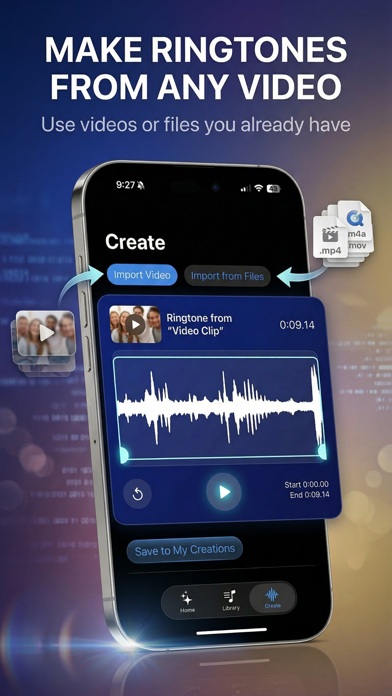
- Open Ringy and open its creation tools. Choose the available video import option and select the saved clip. If Photos access is limited, include that video in the allowed selection.
- Choose a short excerpt and preview its beginning and end inside the app. Trim away a silent opening. Save it with a name you will recognize.
- Follow the export instructions and use the system Use as Ringtone action when your phone offers it. Share the exported audio, not the TikTok URL.
- Open Settings → Sounds & Haptics → Ringtone and confirm the installed sound’s name.
The direct share action is shown in our supplied iPhone evidence, but its availability is not guaranteed for every OS build or input file. If it is absent, use the iPhone setup alternatives. GarageBand provides another route once you have usable audio: import the file, trim it to at most 30 seconds and share the project as a ringtone. Protected songs cannot be used for that export. Our GarageBand guide has the detailed steps.
Set the sound on Android
For a catalogue ringtone, open its details in Ringy and choose Use as Ringtone. If Android requests permission to change system settings, check that the app is Ringy and follow the permission step. Our Samsung guide shows the actual permission and selection screens.
For a saved video, open Create → Import Video where that option is available in your installed Ringy version. Select your clip and follow the maker’s trimming and saving controls, then complete the ringtone assignment. If your version lacks video import, use a ready-made catalogue tone or an audio file you already have.
If you already have the exported audio file, Samsung supports Settings → Sounds and vibration → Ringtone → +, followed by choosing the file and saving the selection. Pixel and other Android phones have different pickers: follow the Android setup guide for your phone. A video or web address is not a replacement for the audio file those pickers expect.
Check the result with an incoming call
Ask someone to call your normal phone number. Previewing the sound in TikTok or Ringy only checks playback inside that app. A contact-specific ringtone, Silent mode, Focus or Do Not Disturb can affect the result. If the wrong sound plays, check the selected name and any contact override before exporting again.
A call ringtone does not automatically become your alarm, text tone or WhatsApp call sound. Use the alarm guide if you meant a wake-up sound. For a silent or missing file, follow ringtone troubleshooting; for an import that fails, check Ringy export and import help.
Can I do this for free?
Use the access shown for the sound and tools in your installed app. Ringy has different access rules for sounds and features; downloading the app does not mean every remix or creation option is free. TikTok’s save option also depends on the creator’s download setting. See current Ringy access guidance before choosing a paid option.
Related guides
- Find the ringtone you heard on TikTok
- Turn a saved video into a ringtone, including your own YouTube clips
- How to change your iPhone ringtone or set a song
- How to change your Android ringtone to a song
Sources & compatibility
TikTok download instructions, Apple documentation and existing Ringy product evidence reviewed October 22, 2026. iPhone video audio export and Android Import Video were checked in repository source. No new physical-device TikTok-to-ringtone test was performed; shipped-version and share-action limits are stated.
- TikTok: Download content
- Apple: Use tones and ringtones
- Apple: Create a custom ringtone on your iPhone
- Ringy’s current iPhone App Store listing
- Ringy ringtone catalogue
- Samsung: Set a ringtone on your Galaxy phone
Ringy publishes this guide about its own app and phone setup. Menus can vary by device, OS version and region. For a correction, email help@rin.gy.